
How the Federal IT Contract Tracker works
The Federal IT Contract Tracker is a working demonstration by Ezel Data Services LLC. It is a small production data system: it runs on its own every day, checks its own data before publishing, and alerts a person when something goes wrong. This page explains how it is built and why, for readers who want to look under the hood.
At a glance
- Source: the public USAspending.gov API (federal contract awards and transactions).
- Schedule: a cloud job runs early every morning, unattended. A full run takes under a minute.
- Volume: about 2,100 contract awards and 4,500 contract actions per run, for Arizona and Kentucky.
- Safeguards: automated data-quality checks run before anything is published. If any check fails, the dashboard keeps showing the last good data and an alert email goes out.
- Stack: Python, Google Cloud (Cloud Run, Cloud Storage, BigQuery, Cloud Scheduler, Cloud Monitoring), SQL, Flask, Chart.js, and Terraform.
- Cost: designed to run within Google Cloud's free tiers, typically a few dollars a month or less.
Data source and scope
USAspending.gov publishes federal spending data through a free, public API. The tracker requests:
| Filter | Value |
|---|---|
| Award types | Contracts only: purchase orders, delivery orders, definitive contracts, and BPA calls. Indefinite-delivery vehicles (IDVs) are excluded because their amounts are ceilings, not spending. |
| Industry | NAICS 5415xx (computer systems design and related services) and 518210 (data processing and hosting) |
| Location | Place of performance in Arizona or Kentucky |
| Period | Federal fiscal year 2024 (October 1, 2023) to date |
It pulls two views of the same contracts:
- Awards: one record per contract, with its lifetime value. Used for "who holds the contracts."
- Transactions: one record per contract action (the original award and each modification), with a date and amount. Used for spending by year, because an award's lifetime value doesn't say when the money was obligated.
Ingestion
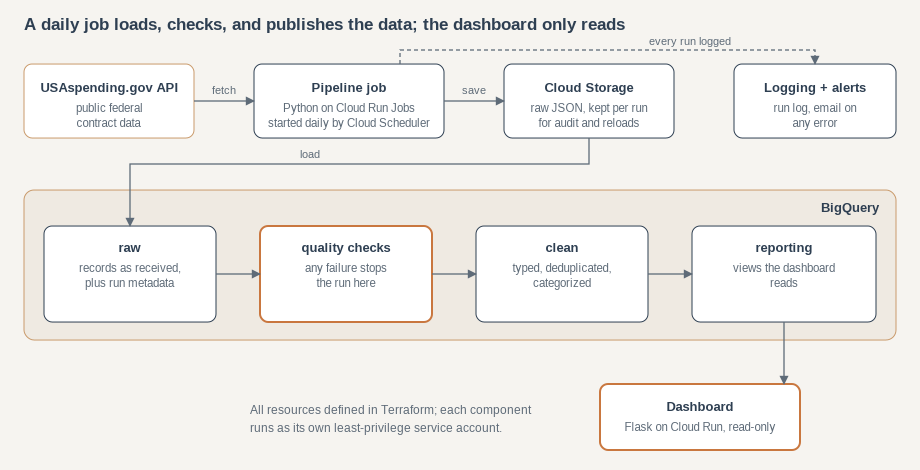
The pipeline is a Python job packaged as a container and run on Cloud Run Jobs. Cloud Scheduler starts it daily.
- Plan the slices. Awards are requested per state across the whole period. Transactions are requested per state and fiscal year, since each action falls in exactly one fiscal year. Slicing keeps every request well under the API's paging limits and makes any gap easy to trace.
- Count, then fetch. For each slice, the job asks the API's count endpoint how many records to expect, then pages through the results. Temporary errors (throttling, server errors, timeouts) are retried with increasing waits. Any other error stops the run.
- Keep the raw data. Each slice is saved to Cloud Storage as newline-delimited JSON, in a folder per run. Records are wrapped with the run ID, state, fiscal year, and fetch time, but are otherwise left exactly as received.
- Load. The files are loaded into BigQuery's
rawtables, which keep each API record in a JSON column. A renamed or added API field cannot break the load. - Log. Every slice's expected count, fetched count, and timing is written to a run log table.
Each run is a full refresh of the period. With a few thousand records, re-pulling everything is simple and cheap, and it picks up corrections the source makes to older records automatically.
Data quality: validate, then publish
Before the clean tables are rebuilt, a set of checks runs against the new raw data. Results are stored for every run.
| Check | Severity |
|---|---|
| Every slice fetched exactly the number of records the API reported | Error |
| BigQuery holds exactly the rows the run fetched | Error |
| Required award fields are present (identifier, amount, start date, recipient) | Error |
| Required transaction fields are present (identifier, modification, date, amount) | Error |
| Each transaction's date falls in the fiscal year of the slice it came from | Error |
| Contract actions duplicated by the source, removed in the clean layer | Info |
| Awards with no product/service code (can't be categorized) | Warning |
| Spending since FY2024 that exceeds an award's lifetime value | Warning |
If any error check fails, the run stops before publishing. The dashboard keeps serving the last good data, and the failure is recorded and emailed. Warnings and information are recorded but don't block publishing.
One finding from building this: the API returns some contract actions twice, identical in every field (about 90 per run). The clean layer removes them, and the duplicate count is tracked as an information check.
Data model
| Layer | Contents |
|---|---|
| raw | Awards and transactions exactly as received, one row per record per run, partitioned by day |
| clean | One row per award and one row per contract action from the latest good run: typed fields, duplicates removed, fiscal year computed, and a spending category |
| reporting | Views for the dashboard: spending by fiscal year and agency, top recipients, and new awards |
| ops | The run log and data-quality results |
Categories come from the first character of each contract's product/service code (PSC): D for IT services, 7 for IT products, R for professional support, and everything else as Other. The mapping lives in a version-controlled SQL file, so a category change is a reviewed code change.
Amounts are net obligations: the sum of contract actions in the period, including de-obligations (negative amounts when money is taken back).
All transformations are plain SQL files, run in order by the pipeline and kept in the same repository as the code.
Dashboard
The dashboard is a small Flask application on Cloud Run, with charts drawn by Chart.js. It reads only from the clean and reporting layers.
- Pages: an overview, top recipients, prime-contractor targets, new awards (with an adjustable window), buying agencies, and an About page.
- Filters: state (Arizona, Kentucky, or both) and spending category.
- Caching: query results are cached for an hour, since the data changes once a day.
- Scaling: the service scales to zero when idle and is capped at a small number of instances. A scheduled request keeps it warm during business hours, so weekday visitors don't wait for a cold start.
- Accessibility: every chart has a "show as table" view, and charts use a single color with labels rather than relying on color alone.
Security
- Least privilege. Each component runs as its own service account with only the permissions it needs:
- the pipeline can write raw files and edit its own datasets
- the dashboard can only read
- the image builder can only read uploaded source and push images
- the scheduler can only start the pipeline job
- No stored keys. Services use Google-managed identities. There are no service account key files in the code or on any machine.
- Private storage. Buckets enforce public-access prevention and uniform access control.
- Public data only. The dashboard serves public federal data and holds no personal or client information. It's open to read without a login and has no write paths.
- Separation from other work. The demo runs in its own Google Cloud project, account, and code repository.
Infrastructure as code and deployment
Everything in the diagram is defined in Terraform: storage, datasets, service accounts and their permissions, the job, the schedule, the dashboard service, the custom domain, and the alert. Terraform state is stored in a versioned cloud bucket. Every change is previewed with terraform plan before it is applied.
A deploy is one script:
- It refuses to run if the code being deployed isn't committed, so every image traces to an exact version.
- Cloud Build builds the container in the cloud and tags it with the git commit.
- The script updates the image version in the Terraform settings, shows the plan, and asks for confirmation before applying.
Automated tests (pytest) cover API paging and retries, fiscal-year logic, data-quality gating, query parameters, and every dashboard page.
Monitoring and recovery
- Run log: every run records its slices, counts, timing, and final status.
- Alerting: the job writes structured logs. Any error-level log entry, from a failed check, a crash, or a timeout, triggers an email alert.
- Automatic retry: a failed run is retried once.
- Recovery: raw files from every run are kept for a year, so any run can be reloaded, and transformations can be re-run on any past run.
Design decisions and trade-offs
| Decision | Why | Trade-off |
|---|---|---|
| Full daily refresh instead of pulling only changes | Simple, self-correcting, and fast at this volume | Would need to switch to pulling only changes if the scope grew a lot |
| Keep raw data exactly as received (JSON column) | Every number traces back to its source; schema changes can't break loads | Typed columns are extracted in the clean layer instead |
| Validate, then publish | A bad run never reaches the dashboard | Data can be a day old until a failure is fixed |
| Plain SQL files instead of a transformation framework | Fewest moving parts for five transformation steps | No built-in lineage graph; Google's Dataform is a natural next step |
| Serverless (Cloud Run) instead of always-on servers | Near-zero cost when idle, nothing to patch | Occasional cold starts outside business hours |
Known limitations
- USAspending.gov typically reports awards days to weeks after they are made, so "new awards" lag real time.
- Categories based on product/service codes are approximate. Agencies sometimes code IT work under professional services.
- Place of performance is as reported by agencies, and multi-state work is reported under one state.
- The award and transaction searches don't match perfectly. A small number of contract actions belong to awards that the award search doesn't return. The dashboard handles this, but award details are missing for those actions.
Questions about this project, or a similar pipeline for your own data? Contact robert@ezeldata.com · www.ezeldata.com